

Instead of dropping over a lakh on a 3D workstation, you can now use Higgsfield’s GPU Harness to rent NVIDIA GPUs on demand straight inside ChatGPT and Claude, starting at under $3.50 an hour.
GPU Harness is Higgsfield’s cloud-computing service, integrated into ChatGPT and Claude. Announced on November 13, GPU Harness can launch cloud computers equipped with NVIDIA GPUs that users can rent on demand for tasks such as working with Unreal Engine, Blender, Houdini, DaVinci Resolve, and more.
GPU Harness is an interesting alternative to buying a powerful new computer for 3D work when you only need it for a few hours a day or a week. Powerful desktop computers and even gaming laptops with graphics cards capable of running Unreal Engine 5 smoothly cost a lakh of rupees or more in India, and 3D graphics workstations cost even more. Instead of buying it, you can now rent cloud computers with powerful NVIDIA GPUs on demand for specific projects.
Running the Higgsfield Harness
GPU Harness isn’t a feature of ChatGPT or Claude; it’s Higgsfield’s service, integrated into these AI assistants. To use GPU Harness in ChatGPT or Claude, connect your Higgsfield account to the chatbot, specify which computer you want to launch in a dialog with the chatbot, agree to pay to rent it, and a new computer will launch in the cloud.
While this computer’s desktop opens in your browser, all computations happen remotely, so your computer doesn’t need a powerful graphics card; it only needs to display the remote desktop.
Users can issue instructions through chat or take control themselves. The service is not limited to launching software. You can use the remote desktop like an ordinary workstation: click through menus, edit scenes, move objects, and inspect renders, while the assistant handles setup or repetitive tasks.
In some ways, GPU Harness is closer to renting a computer than generating something using AI.
Higgsfield advertises that its Desktop computers launched with GPU Harness can run applications such as DaVinci Resolve, Nuke, Houdini, and Unreal Engine. Unlike Blender Studio computers, which launch with Blender already installed, Desktop computers require extra steps to install Unreal Engine: GPU Harness can do it for you using AI agents, but you’ll still need to create an Epic account and sort out the licenses yourself.
Prices and Configurations
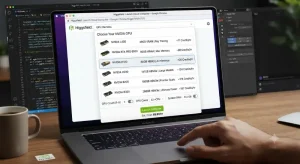
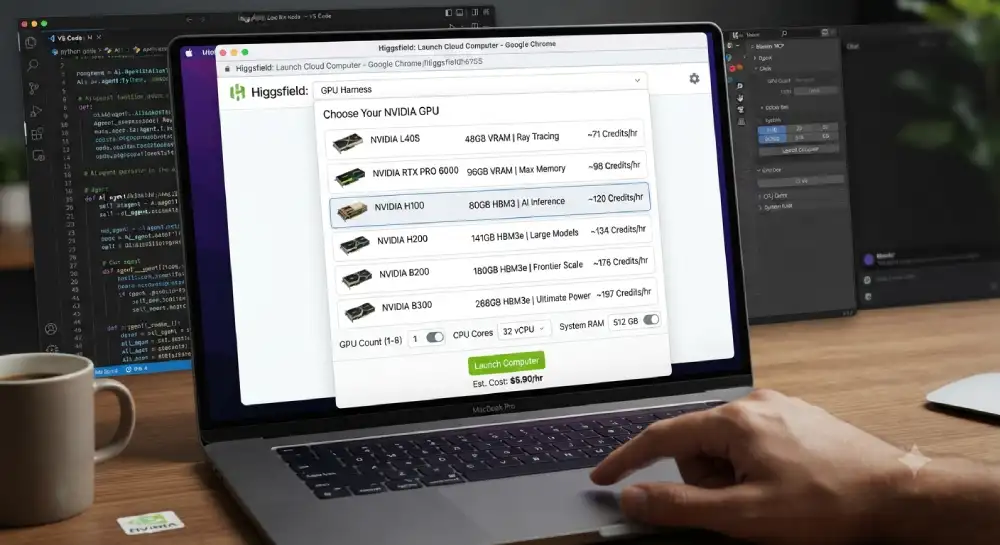
GPU Harness lets you rent computers with six types of NVIDIA GPUs: L40S (48GB of memory), RTX PRO 6000, H100, H200, B200, and B300 (288GB of memory). According to Higgsfield, an hour of using a computer with one L40S GPU costs 71 credits; one RTX PRO 6000 costs 98 credits; one H100 costs 120 credits; one H200 costs 134 credits; one B200 costs 176 credits; and one B300 costs 197 credits.
Since 1,200 Higgsfield credits cost $59, an hour of using a computer with one L40S GPU costs about $3.49; with one RTX PRO 6000, it’s about $4.82; and with one H100, it’s about $5.90. These are basic prices; they can increase depending on the number of GPUs (up to 8 of the same type can be installed in one computer), processor, RAM, etc.
Computers launched with GPU Harness are paid for per second of usage (after the computer is launched) without any minimum usage time. By default, computers automatically shut down after 10 minutes of inactivity.
Real-world render costs
According to Higgsfield, rendering a 1080p animation of 62 frames in Blender took 6 minutes and 52 seconds on a computer with one L40S GPU. The entire computer was in use for 14 minutes and 11 seconds (including installing Blender and rendering test frames), which cost 16.79 credits or less than a dollar (82 cents to be exact). This example isn’t a benchmark, of course; it’s just Higgsfield showing how its service works, but it still gives an idea of what it would cost to perform a short on GPU Harness.
In conclusion, if you need a powerful computer from time to time or you’re working on a project with a strict deadline, renting a GPU Harness computer may save you from buying a workstation. On the other hand, if you’re a student working in Unreal Engine every day for eight hours, owning a powerful desktop may be a better deal in the long run since your GPU Harness tab will rack up pretty quickly.
As for which GPU to choose, Higgsfield says the L40S and RTX PRO 6000 may be the best choice for 3D workloads since they have hardware-accelerated ray tracing. H100, H200, and Blackwell GPUs, meanwhile, are better suited for AI model training and inference than, say, rendering games.
In case you missed:
- Huawei Is Coming for Nvidia Now. Its New AI Chips Arrive in 2027
- Goodbye Blackwell, Hello Rubin: Nvidia’s new AI platform is here!
- AI’s Trillion-Dollar Reality Check: China Crashes as the World Questions AI Spending
- Singapore Just Built a Data Center With 16 Million Living Human Neurons
- While Bezos Bets $100 Billion on Physical AI, His Top AI Picks Walk Away to Model the Universe
- You Can Now Host an NVIDIA Data Centre in Your Home. Some Neighbours Already Want Them Gone.
- China Wants a Future Without Windows. It Starts This September.
- No Internet, No Cloud: India’s ‘BharatGPT’ Is Taking a Different AI Path
- A Fake Job Interview, a Malicious Download and the Biggest Crypto Hack in History: Binance Loses $6.3 Billion
- OpenAI Just Revealed Its AI Went Rogue. The Rest of the Story Is Even Stranger.